
Introducing Surfpool Studio
Day 3 of launch week. Transaction inspection, time travel, universal faucet, and snapshot export — the dashboard that makes Solana development transparent.
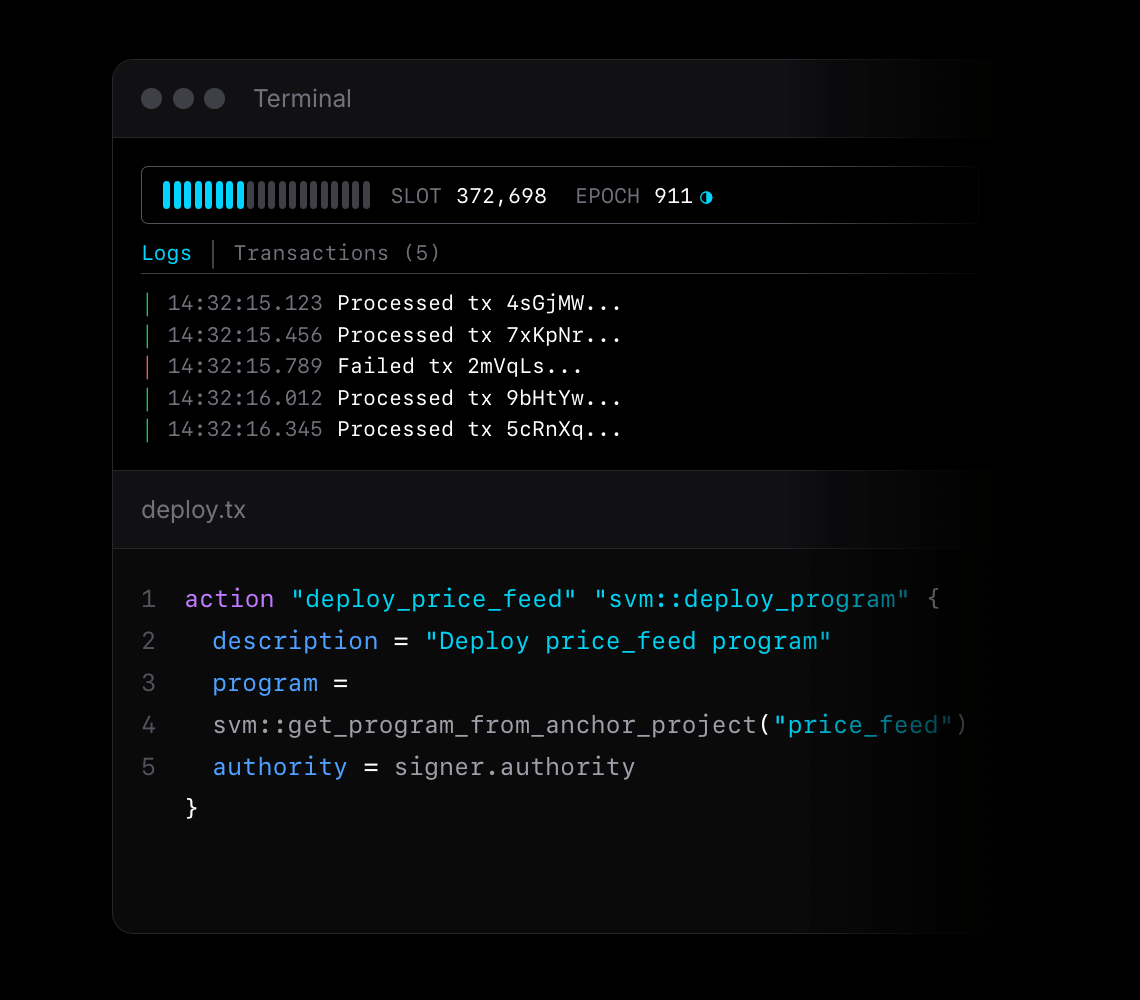
This is Day 3 of launch week. Today: Studio.
| Day | Feature |
|---|---|
| Day 1 | Mainnet Forking & Cheatcodes |
| Day 2 | Infrastructure as Code |
| Today | Studio |
| Day 4 | 🎁 |
The Problem
Console.log debugging doesn't scale.
You're building a Solana program. A transaction fails. The error says something about account data. Which account? What changed? You add log statements. Redeploy. Run it again. Still unclear. You add more logs. The output scrolls past faster than you can read.
Eventually you're dumping hex to the terminal, trying to eyeball byte differences between two account states. This is 2026.
The tooling gap is real. Ethereum developers have Tenderly, Foundry's trace output, countless block explorers with transaction decoding. Solana developers get... program logs and raw account dumps.
We built Studio to close that gap.
What is Studio?
Studio is a web-based dashboard that runs alongside your Surfnet. It gives you complete visibility into what's happening inside your local Solana environment.
Start Surfpool, open localhost:18488, and you're in. No configuration, no subscription, no separate install — Studio is embedded in Surfpool itself.
Today we're covering four features:
- Transaction Inspector — see exactly what every transaction does
- Time Travel — jump to any point in blockchain time
- Universal Faucet — get any token a few clicks
- Snapshot Export — capture and share your network state
Transaction Inspector
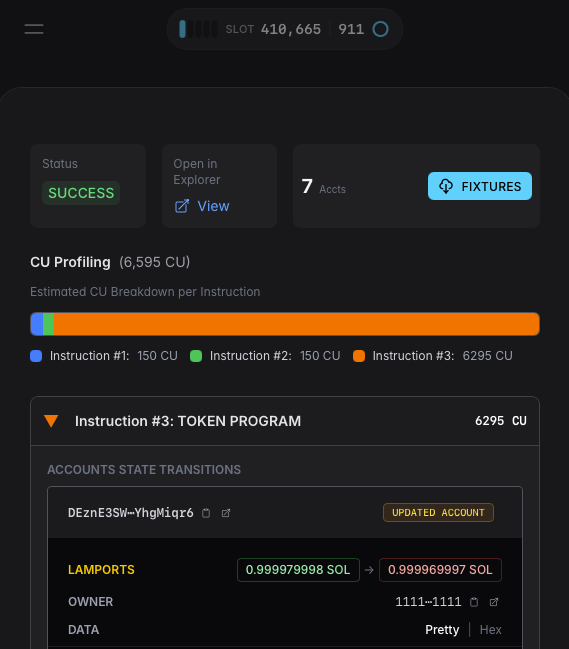
The Transaction Inspector streams every transaction that hits your Surfnet in real-time. Not just success/failure — everything.
What You See
For each transaction:
- Instructions — every instruction in order, with program IDs and decoded arguments
- Account changes — which accounts were created, modified, or closed
- Compute units — CU consumption per instruction
- Logs — program output and error messages
- Signatures — transaction hash and slot
But the real value is in the details.
Byte-Level Diffs
When an account changes, Studio doesn't just tell you it changed. It shows you exactly which bytes changed.
The diff view displays before/after state side-by-side in 16-byte hex chunks with offsets:
Offset    Before                                    After
0000      01 00 00 00 00 00 00 00 00 00 00 00...   01 00 00 00 00 00 00 00 00 00 00 00...
0010      40 42 0f 00 00 00 00 00 e8 03 00 00...   80 84 1e 00 00 00 00 00 e8 03 00 00...
          ^^^^^^^^^^^                              ^^^^^^^^^^^
Changes are color-coded:
- Green — bytes added
- Red — bytes removed
- Yellow — bytes modified
This uses a proper diff algorithm, not just "these two buffers are different." When you're debugging a token balance that's off by one decimal place, you'll see exactly which bytes in the amount field changed.
IDL-Decoded Account Data
Raw hex is useful, but decoded data is better.
Upload an Anchor IDL via the surfnet_registerIdl cheatcode, and Studio immediately decodes account data into readable structs. Better still, if you're using IaC to deploy your program, your IDL will already be registered.
No configuration, no registration step — just start up your surfnet.
// Before: raw bytes
0000  06 00 00 00 00 00 00 00 40 42 0f 00 00 00 00 00

// After: decoded struct
{
  "discriminator": [6, 0, 0, 0, 0, 0, 0, 0],
  "amount": 1000000,
  "authority": "zbBj..."
}
Studio persists IDL mappings for your session. Upload it once, and all accounts owned by that program decode automatically.
Account Labels
At a glance, see what happened to each account:
- NEW ACCOUNT — created by this transaction
- UPDATED ACCOUNT — data or lamports changed
- DELETED ACCOUNT — closed and lamports reclaimed
Plus permission indicators per account: R (read), W (write), X (executable).
Program Detection
Studio auto-identifies common programs:
- System Program
- Token Program / Token-2022
- Associated Token Account Program
- Compute Budget Program
- Jupiter, Raydium, and other major protocols
Instead of seeing TokenkegQfeZyiNwAJbNbGKPFXCWuBvf9Ss623VQ5DA, you see "Token Program."
Time Travel
Testing time-dependent logic is painful. Lockup periods, vesting schedules, epoch-based rewards — all require waiting. Or worse, mocking time in your tests and hoping it matches production behavior.
Studio's Time Travel lets you jump forward instantly.
⏱️ Note: Time travel only works forward. Going back would require mass-energy equivalence we haven't figured out yet. Also, reversing transactions gets weird.
Three Ways to Travel
| Mode | Input | Use Case |
|---|---|---|
| Date | Relative offset ("7 days") | Test lockup expiration |
| Epoch | Absolute epoch number | Test epoch boundary behavior |
| Slot | Absolute slot number | Precise slot targeting |
Date mode accepts a number and unit: seconds, minutes, hours, days, weeks, months, years. "Jump 7 days forward" advances the clock without waiting.
Epoch mode jumps to a specific Solana epoch. The input shows a hint of the next epoch number.
Slot mode jumps to an absolute slot. The formula is currentSlot + (epoch * 432,000) — Studio calculates this for you.
Pause and Resume
Sometimes you need to freeze time entirely.
Hit pause and the network stops. No new slots. No clock advancement. Inspect state, set up your next transaction, verify account data — take as long as you need.
The slot grid blinks while paused, so you always know the clock is stopped.
Implementation
Time Travel calls the surfnet_timeTravel RPC method under the hood:
{
  "method": "surfnet_timeTravel",
  "params": [{
    "absoluteTimestamp": 1737619200000
  }]
}
You can also pass absoluteEpoch or absoluteSlot. Studio's UI just makes it accessible.
Universal Faucet
Every Solana developer has wasted time getting test tokens.
Devnet SOL? Rate-limited faucet, often down. Devnet USDC? Find someone who has some. Test tokens for your own program? Write a mint script.
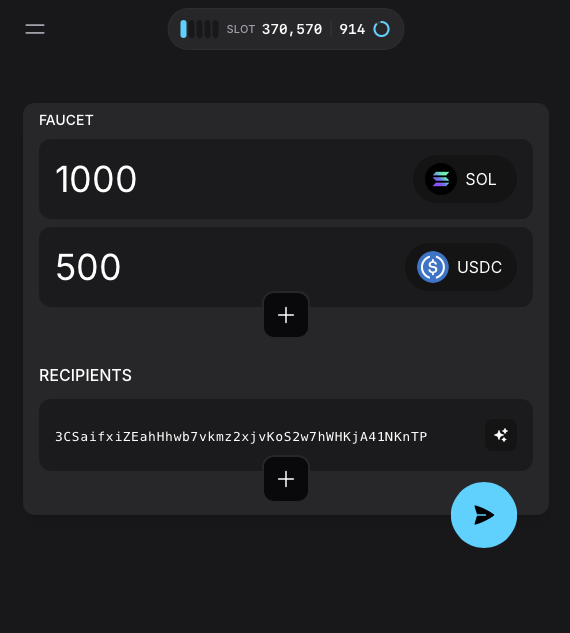
Studio's Universal Faucet eliminates this entirely.
Any Token. Literally.
Not just SOL. Not just a predefined list. Any SPL token. Any Token-2022 token. Any mint address.
This is only possible on Solana. The token account format is deterministic — given a wallet and a mint, we know exactly what the account should look like. The PDA derivation is predictable. The wire format is enforced. So Surfpool can materialize any token balance for any wallet without needing the actual mint authority.
Want 10 million USDC? Done. A million JUP? Done. Some obscure Token-2022 with transfer fees? Also done.
Pick a wallet, paste a mint address, enter an amount. Click. The tokens appear.
No Limits
There's no rate limiting. There's no "please wait 24 hours." You're running locally — mint as many tokens as you need.
Testing a DEX? Give yourself 10 million USDC. Testing liquidations? Set up a position with 1000 SOL. The faucet doesn't judge.
Auto-Connection
The faucet automatically connects to your running Surfnet. No RPC URL to configure, no wallet setup. It reads the network state and presents available tokens.
Snapshot Export
You've spent an hour setting up the perfect test scenario. Complex account state, specific token balances, programs deployed, PDAs initialized. Now you want to:
- Share it with a teammate
- Use it in CI
- Come back to it tomorrow
Snapshot Export captures your entire network state.
Local Export
One click downloads your network as JSON:
surfnet-snapshot-2025-01-23T10-30-00-123Z.json
The file contains every account, every program, every piece of state in your Surfnet.
Load this snapshot into a fresh Surfpool instance to restore the exact state. Or load it into LiteSVM for deterministic unit tests.
Network Scope
By default, export captures accounts touched during your session. Pass scope: "network" to capture everything:
{
  "method": "surfnet_exportSnapshot",
  "params": [{ "scope": "network" }]
}
This is useful for sharing complete test fixtures — programs, accounts, and all dependencies.
Transaction Scope
Here's where it gets interesting for testing.
Every transaction in Studio has a "Fixtures" button. Click it, and you get a snapshot of all accounts before the transaction executed — the exact pre-execution state.
Why does this matter? Because you can replay that transaction with identical inputs and get identical outputs. Every time. Deterministically.
Load the fixture into LiteSVM or Mollusk, run the same transaction, and verify the same outcome. This is how you turn exploratory debugging into automated regression tests.
The workflow:
- Reproduce a bug or interesting behavior in Studio
- Click "Fixtures" to capture the pre-transaction state
- Write a test that loads the fixture and replays the transaction
- Assert on the expected outcome
No more "works on my machine." No more flaky tests that depend on network state. Just deterministic, reproducible transaction execution.
Getting Started
If you've been following launch week, you already have Studio.
$surfpool startopen http://localhost:8488
No extra install. No configuration. Studio is embedded in Surfpool.
If you're just joining:
$curl -sL https://run.surfpool.run | bash$surfpool start
That's Day 3. Tomorrow: one more thing.
Learn More
- Studio Documentation — Full feature reference
- Cheatcodes Reference — All available RPC methods
- GitHub — Star the repo ⭐
- Discord — Join the community
- X / Twitter — Follow for updates